Hide the LinkedIn feed
The post feed on linkedin.com/feed disappears. Messaging, jobs, notifications, search and profiles stay fully available.
Chrome extension for LinkedIn and X
Social Silencer is a Chrome extension for LinkedIn and X. It hides the home feed and the timeline with a CSS rule so you can keep using the networks for work. Messaging, search, profiles and jobs stay reachable. Custom CSS selectors hide further elements, settings stay in your browser, and no account is required.
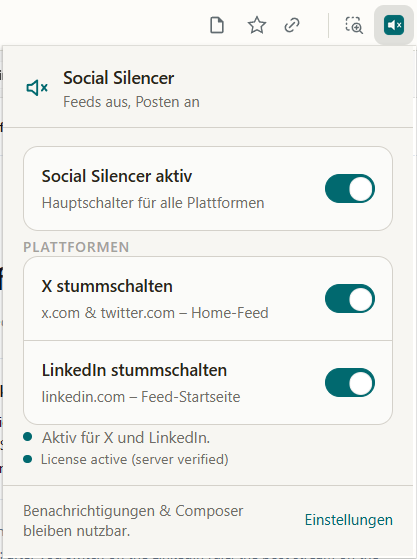
A short walkthrough: install the extension, open the popup and mute the LinkedIn and X home feeds.
This demo loops automatically and plays muted until you interact with it. Delivered via youtube-nocookie.com. Watch on YouTube
In short: Social Silencer hides the home feed on LinkedIn and X with CSS rules and is designed to keep messaging, search and profiles available. It is free for the first 3 days, then USD 9.90 per month, can be cancelled any time and needs no user account.
3 days free after install, 3 more free days at checkout, then USD 9.90 per month · cancel any time · no account required
3 days free, then USD 9.90 per month, cancel any time. Built by Mons Altus Ventures GmbH in Graz, Austria — full imprint and privacy policy on this site.
Install the extension first: it creates your installation key and starts the purchase for you, so your licence is linked to the right browser automatically.
LinkedIn and X are work tools — the feed is not. It is exactly what costs you your focus.
Four things, nothing more — the extension is deliberately small.
The post feed on linkedin.com/feed disappears. Messaging, jobs, notifications, search and profiles stay fully available.
“For you” and “Following” on x.com are hidden, and optionally trends and account suggestions too. Direct messages and single posts keep working.
Add your own CSS selectors to hide further elements when a platform changes its layout or when something else distracts you.
Settings live in your browser via chrome.storage. There is no sign-up, no login and no transfer of feed content.
Three steps from install to a quiet feed.
The key answers in one sentence each.
No posts, messages, contacts or profile data from LinkedIn or X are collected. Only a random installation ID and a device secret reach the server, and the secret is stored as a SHA-256 hash only.
Read the privacy policy3 days free after install, 3 more free days at checkout, then USD 9.90 per month
Install the extension first: it creates your installation key and starts the purchase for you, so your licence is linked to the right browser automatically.
Start the purchase from inside the extension — your installation is then unlocked automatically.
These facts are maintained by Mons Altus Ventures GmbH and are used unchanged in the page copy, the page metadata and the structured data of this website.
Feed blockers compared: four approaches and what each is good for
Social Silencer is an independent product of Mons Altus Ventures GmbH. It is not affiliated with, endorsed by or reviewed by LinkedIn Corporation or X Corp. LinkedIn and X are trademarks of their respective owners.
Platform compatibility is tested manually on LinkedIn and X before each review date shown above. LinkedIn and X change their interfaces without notice, so a rule that works today can stop matching after a layout update. When that happens, a custom CSS selector can be added in the extension and the built-in rules are updated in a later release. Pages on this site are written and maintained by the Mons Altus Ventures GmbH team; no individual author profile is published.