Social Silencer features
Social Silencer hides the distracting parts of LinkedIn and X and is designed to leave the rest of the platform usable.
What does Social Silencer hide, and what stays usable?
Social Silencer hides the LinkedIn home feed, the For You and Following timelines on X and, optionally, trends and account suggestions. Everything else on both platforms is left in place, including messages, notifications, search, jobs and profiles. Additional elements can be hidden with custom CSS selectors stored locally in Chrome.
This answer summarises the key point of this page.
Social Silencer can hide the LinkedIn feed, the X timeline, trends and account suggestions, supports custom CSS selectors, stores all settings locally in Chrome and needs no user account.
What the extension looks like
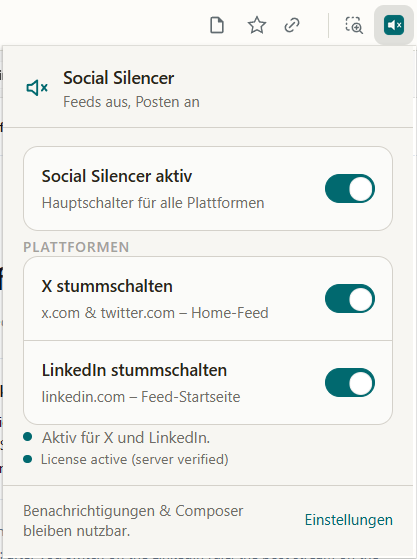
- Main switch for all platforms
- Separate toggles for X and LinkedIn
- Licence status shown after server verification
- Notifications and the composer stay usable
Hide the LinkedIn feed
The post feed on the LinkedIn home page is hidden with a CSS rule; the rest of LinkedIn is designed to stay usable.
- Home feed on linkedin.com/feed
- Post suggestions and “Recommended for you”
- Messaging, jobs, notifications, search and profiles stay reachable
Hide the X (Twitter) timeline
On x.com, “For you” and “Following” are hidden; trends and account suggestions can be switched off separately.
- “For you” and “Following” timelines
- Trends sidebar and “Who to follow” suggestions
- Direct messages, search and single posts keep working
Custom DOM selectors
Add any CSS selector to hide additional elements — useful when a platform changes its layout.
Selectors are stored locally and applied on every page load, so the extension stays useful even when LinkedIn or X rename their classes.
No user account, no sign-up
Access is tied to a random installation ID instead of an account — no email and no password required.
On first run the extension generates a random installation ID and a device secret. The secret is stored server-side as a SHA-256 hash only and is used purely for license verification.
Price and cancellation
Social Silencer is free for 3 days, then USD 9.90 per month, can be cancelled any time and is billed through Whop.
- 3 days free, then USD 9.90 per month
- Cancel any time, no minimum term
- Payment and subscription management via Whop
A custom selector, in one example
Custom selectors are plain CSS selectors; every matching element is hidden on linkedin.com and x.com.
Example: main div[data-id^="urn:li:activity"] hides LinkedIn activity cards, and div[aria-label^="Timeline:"] hides a timeline container on X. Selectors are stored locally and applied on each page load, so you can react to a layout change before an extension update arrives.
Browser support
Social Silencer is a Manifest V3 Chrome extension and targets Chrome on desktop.
- Chrome on Windows, macOS and Linux
- Chromium-based browsers such as Edge, Brave, Opera and Arc can load it, but are not part of our regular testing
- Mobile browsers do not support Chrome extensions
Permissions
The extension requests host access to linkedin.com and x.com plus storage for local settings.
- Host access is needed to apply the hiding rules on those two sites
- chrome.storage keeps your switches and custom selectors on the device
- No access to other websites, browsing history, tabs or downloads is requested
Settings stay local
Your switches and selectors live in the browser profile, not on our servers.
Removing the extension removes those settings. There is no sync between browsers, so each installation is configured separately.
Licence behaviour
The extension checks its licence against our server using a random installation ID and a device secret that is stored as a SHA-256 hash.
- One licence is tied to one installation
- A short grace period covers temporary check failures after a period ends
- When a licence is inactive, the hiding rules stop applying; nothing else about your browser changes
Product facts
- Product
- Social Silencer
- Category
- Chrome extension / productivity browser extension
- Purpose
- Hides distracting home feeds on LinkedIn and X
- Platforms
- LinkedIn and X
- Browser format
- Chrome Manifest V3 extension
- Price
- 3 days free, then USD 9.90 per month
- Free trial
- 3-day free trial on the paid plan, then billed monthly
- Billing provider
- Whop
- Operator
- Mons Altus Ventures GmbH
- Location
- Graz, Austria
- Account requirement
- None — no separate Social Silencer user account
- Data handling
- settings and custom selectors are stored locally in the browser; a random installation ID and a device secret are used for licence verification
- Last compatibility review
- 4 August 2026
These facts are maintained by Mons Altus Ventures GmbH and are used unchanged in the page copy, the page metadata and the structured data of this website.
Technical basis: the extension follows the Chrome Manifest V3 extension format and stores settings through the chrome.storage API. The requested permissions are shown by Chrome at install time. Chrome documentation on Manifest V3 · chrome.storage · Permissions
Compatibility with the LinkedIn and X layout last checked on 4 August 2026.
Ready for a quiet feed?
Start the purchase from inside the extension — your installation is then unlocked automatically.
See pricingRelated pages
About this page
- Published by Mons Altus Ventures GmbH, Graz, Austria
- Last reviewed: 4 August 2026
- Contact: office@mav.gmbh
- Privacy policy · Imprint
Social Silencer is an independent product of Mons Altus Ventures GmbH. It is not affiliated with, endorsed by or reviewed by LinkedIn Corporation or X Corp. LinkedIn and X are trademarks of their respective owners.
Editorial note
Platform compatibility is tested manually on LinkedIn and X before each review date shown above. LinkedIn and X change their interfaces without notice, so a rule that works today can stop matching after a layout update. When that happens, a custom CSS selector can be added in the extension and the built-in rules are updated in a later release. Pages on this site are written and maintained by the Mons Altus Ventures GmbH team; no individual author profile is published.